"Search Engine Journal" - 7 new articles
- Digg Releases Mobile App for Android
- Yahoo Brings its Entertainment Portal to the iPad
- Google is also iPad-Ready
- Google Acquires Online Video Platform – Episodic
- Top 5 iPhone Apps for Search & Internet Marketers
- Track Keywords with Topikality
- 3 FireFox Addons For Quicker Access to Google Definitions
- More Recent Articles
- Search Search Engine Journal
Digg Releases Mobile App for Android
When Digg announced its Digg for iPhone app a couple of weeks ago, for awhile I thought nobody would noticed it as I'm beginning to think that Digg is losing its popularity. But I was wrong. Digg for iPhone app managed to get several thousands of downloads. In short it was a pretty successful stint. And so to follow it up, Digg has also released another mobile version, this time for Android devices.
Just like its iPhone version, Digg for Android was created to offer an ideal mobile Digg browsing experience for Android devices. It takes full use of the large screen display of Anroid devices such as the Nexus One and Motorola Droid. The app lets you browse and digg stories and comments and supports landscape mode when browsing story titles and pages that load in the in-app browser. Essential everything that what the Digg for iPhone can pretty much do.
To download Digg for Android app on your Android devices, simply search for Digg on the Android marketplace, visit the download link using your Android devices or simply scan the QR codes below using your Android phone.
Check out the SEO Tools guide at Search Engine Journal.
Digg Releases Mobile App for Android


Yahoo Brings its Entertainment Portal to the iPad
Aside from Google Yahoo is also making its presence felt in the iPad party. For Yahoo's part it's by way of making its entertainment portal iPad-ready. Yahoo Entertaiment for iPad offers an iPad-friendly user interface for exploring entertainment content, television listings, videos, news and more.
Yahoo Entertainment leverages on the powerful features of the iPad for creating interactive and personal experiences fully utilizing the iPad's multi-touch feature and geo-location functionality for pinpointing consumers' locations in delivering relevant, local televisions listings and content. The Yahoo Entertainment App for the iPad also features both portrait and landscape displays.
Yahoo senior vice president of Integrated Consumer Experiences said:
"Devices like the iPad allow Yahoo! to create new experiences and expand the art of what's possible in the eyes of consumers. Just like we did with Connected TV and mobile, we successfully re-imagined the consumer experiences for an entirely new platform. Yahoo! Entertainment for iPad is simply amazing. The combination of compelling and engaging content coupled with unique design and innovation, provides consumers with an unparalleled Web experience."
Key features of the Yahoo Entertainment app for the iPad include:
- TV Program Guide and Listings: Find favorite programs, featured TV shows, and recommendations; customize and filter content for a personalized entertainment guide.
- News, Comics, and Book Reviews: Read the most sought after entertainment news from Yahoo! TV and Yahoo! Movies and more, in an easy-to-navigate, magazine-style layout.
- Original Video Content: From sports to news, discover videos from Yahoo!'s top media properties, including Yahoo! Sports Minute and Tech Ticker. Video content is also available from other notable sources.
Mark this link to get the Yahoo Entertainment app for the iPad once you've received your iPad tomorrow.
Check out the SEO Tools guide at Search Engine Journal.
Yahoo Brings its Entertainment Portal to the iPad


Google is also iPad-Ready
A few more hours before the iPad starts arriving on those who pre-ordered it for the last two weeks or so, and with the excitement building up, Google has also joined the iPad frenzy. The Google Mobile Blog is reporting that they have done some preparations to optimize Google's mobile offering for the iPad's large touchscreen, portability, and rich sensors. These enhancements are more like right-fitting the services for the iPad, and not so much about creating native iPad apps yet.
First to receive some iPad-specific enhancements is Gmail. Google is experimenting on a new user interface built in the Gmail for mobile HTML5 web app. Speficifically this interface include a two-pane view listing down the list of conversations on the left and message window to the right. If you're one of those who ordered the iPad, you can see this two-pane view when you access Gmail.com on the iPad's Safari browser once you've received your iPad.
Other mobile services that Google has for the iPad include Google Search in the top right corner of Safari, YouTube, Map apps for iPad which include high-res satellite and street view imagery and access to Google Mobile App with search by voice.
Check out the SEO Tools guide at Search Engine Journal.
Google is also iPad-Ready


Google Acquires Online Video Platform – Episodic
Google just acquired a new startup, this time specializing on online video platform for broadcasting both live and on-demand content to the web or any web enabled device. The startup called Episodic officially announced the acquisition.
Episodic is a video publishing platform consist of six functional areas – video content management, content ingest and encoding, adaptive bitrate playback, monetization through advertising, and credit card transactions, audience measurement and analytics and syndication. Episodic spans the video value chain and offers publishers and marketers everything they need to manage, measure and monetize online video.
Given those features and functionality, we could immediately deduce the reason why Google bought the startup, definitely use its technology to spruce up YouTube's monetization aspects – something which Google failed to maximize despite its dominance in the online video market.
This was stated in Episodic's announcement saying that their team will be joining Google and will continue to do what they are currently doing – that is providing great video experience to the web, mobile phones and IPTV devices.
The Episodic team also emphasized the fact that their products and services complimented Google's online video services.
Google has not announced the acquisition yet.
Check out the SEO Tools guide at Search Engine Journal.
Google Acquires Online Video Platform – Episodic


Top 5 iPhone Apps for Search & Internet Marketers
Search and Internet marketing can, at times, be a 24 hour job. It doesn't necessarily HAVE to be, but if you want good results and want to keep up with new information often times it is. Sometimes we just want it to be regardless; it's something we enjoy. Even when we leave our computers we're still tempted to take a peek at things or be able to manage our tracking and analytics. Thanks to the beauty of the iPhone and the app store, we can be slightly obsessive but in a not-so-obvious way.
1. SEJ News

This application should be the beginning of your quest for up to date information. SEJ News for iPhone is constantly refreshed when articles are added to Search Engine Journal. When you have some down-time in your day you can open up this application and read your heart out. Simply pull the top to refresh and you'll always have the newest read available.
2. Social Pop

SocialPop! This is a social media/internet marketing/search marketing/social news aggregate from your top favorite sites, including:
and many more. This is necessary if you want to keep your head above the water with the technological changes from day to day. I've noticed that every time I open something, Facebook is adding/improving/changing something. This could be dire if you're a search or internet marketer.
3. Analytics Agent
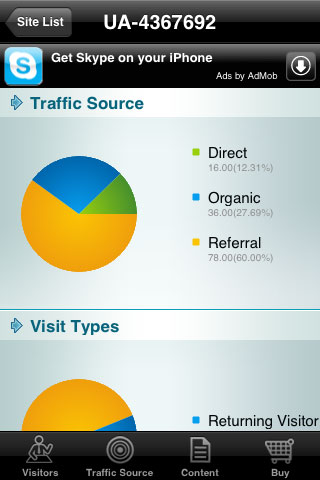
There is both a free version and a formal paid version for this- the application uses your Google Analytics API to access your information for you. It doesn't allow you to actually manage your data but it lets you view it directly from your phone. The lite version is good enough if you don't feel like paying for it. It includes features such as:
- Site usage
- Visitor information
- Absolute page views
- Direct Traffic
- Referring Sites
There are many other features. The formal version is only $2.99 and includes novelties such as:
- Graph and pie charts depicting your traffic for easy viewing
- Top landing pages
- Adwords information- it follows and analyzes customer actions such as purchase, page view, register and the sell opportunity. This will help you figure out how effective your Adwords campaign is.
- Adsense- Improve the effect of Adsense according to click-throughs picked up in Google Analytics. Also provides the sales status.
- E-Commerce data- It can show total revenue, conversion rate, purchased products and more.
The Analytics Agent app is very handy and useful for having data at your finger tips at all times of the day… and the price certainly isn't anything to shake your head at either.
4. SEM Calculator

This awesome little free application has multiple calculators so you can figure out those pesky search engine marketing equations that nobody wants to carry around another calculator or a notepad for. This is also great if you're involved in online media buying. Abilities include:
- CPM calculator
- CPM to CPA conversion
- Banner/Email campaign CPA
- CPC to CPM
- Max CPC for PPC
SEM Calculator is very clean and easy to use… not to mention- everything is mostly black. Your eyes won't be hating you later if you need to stare at it for extended periods of calculating glory.
5. iNetUtil

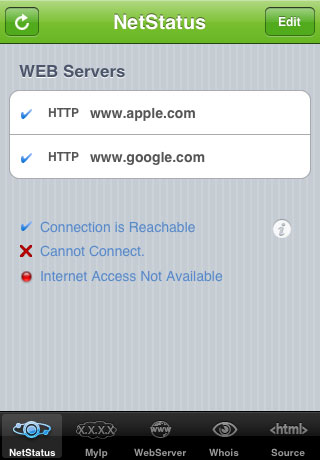
This is another free application. It doesn't really have much that it can do; what it does do is extremely useful. I've been using a few different services online to make sure that my website is up and running at all times. It's actually really nice to know when you're website is offline so you can contact your server company and let them know they need to step up their service. Aside from that, if you're a web design company and you're hosting the sites you make, you need to know that the company you're using is reliable. iNetUtil does just that- it lets you check on your website status from anywhere, at anytime; letting you know whether:
- Internet access is available
- If it cannot connect
- If connection is reachable
There aren't too many useful iPhone apps available yet for search and internet marketing. I mean, there's lots that are OUT there, but most of them have horrible reviews or an interface that isn't that great. These are what I managed to find… are there any others that you readers find useful? If so, please post them into the comments so I can keep growing this list!
What search and Internet marketing iPhone applications do you use?
Check out the SEO Tools guide at Search Engine Journal.
Top 5 iPhone Apps for Search & Internet Marketers


Track Keywords with Topikality
Topikality is an email alert service (something like Google Alerts but with some essential differences. So it can be used as an additional email alert service not an alternative one)
Best to use for:
- Keyword research for your main/base keyword (to see which contexts it is used in);
- Post and content ideas (to see what people write about in this niche).
Limitations:
The tool is currently impossible to use for reputation management because the database seems to small (so you won't be able to spot every other brand mention).
Step 1: Create your search
Like I said, Topicality is best to use for keyword research and post ideas; so grab your main term (this is the one to rank #1 for which you can only dream :)) and create a "topik". I found advanced search easier to use than the main interface.
The tool supports common boolean operators: AND / – as well as exact match operator (quotes):
Step 2: Filter your search results
Give the tool some time to gather results, then start filtering your results.
The tool will remember your choices and adjust future results to your needs and preferences. So just a few days of filtering will improve the quality of search results and alerts.
Use an arrow icon to rank (the one that you like) any result higher and X-icon to delete those results that you found irrelevant:
3. Step 3: Enjoy your email alerts
Now you are going to receive email alerts listing new relevant results based on your initial search query.
You can continue adjusting results right from an email.
Optional: Settings
You can also configure the service settings:
- Set the number of articles per email alert;
- Set an email update period;
- Disable / Enable voting frame for the articles you click through;
- Select your time zone:
As always, I encourage to give the free tool a try and let me know your thoughts in the comments!
Check out the SEO Tools guide at Search Engine Journal.
Track Keywords with Topikality


3 FireFox Addons For Quicker Access to Google Definitions
Although not widely used, DEFINE: Google search operator is very helpful especially for the quick access to the list of reference sources and definitions.
For those who use this operator on a regular basis or just plan to give it a try, today's FireFox Friday post is about making DEFINE operator easier to access in FireFox:
Define:
Define FireFox addon allows to search the definitions of the highlighted text at Google. Just select any term on the current page, right-click on it and select "Define" in the context menu. The search results will open in the new tab:
Inline Google Definitions
Inline Google Definitions – this addon shows Google Definitions for the selected word on the same tab via a handy pop-up. With it, you will also need to use the right-click context menu to access it:
After clicking "Inline Definitions", a tiny draggable window appears listing all the definitions (I wish the links to the definition sources opened in a new tab though):
3. LookItUp
LookItUp is a feature-rich Greasemonkey script that (along with plenty of other options and settings) offers a quick access to Google definitions:
- Just install the script.
- Select any term on the page;
- Click d on your keyboard.
A side panel will open with Google definitions for the chosen term:
Check out the SEO Tools guide at Search Engine Journal.
3 FireFox Addons For Quicker Access to Google Definitions


More Recent Articles


Tramites divorcio vehiculos ahorros child care cursos mascotas cruceros
Your requested content delivery powered by FeedBlitz, LLC, 9 Thoreau Way, Sudbury, MA 01776, USA. +1.978.776.9498
sábado, 3 de abril de 2010














viernes, 2 de abril de 2010
Tramites divorcio vehiculos ahorros child care cursos mascotas cruceros
"Search Engine Journal" - 4 new articles
- How Do You Un-Clutter Your Twitter Stream?
- 5 Tools to Upload and Share Your (SEO) Documents
- Microsoft Bing Local Listing Center Backlog? What Is It About The Claiming Process?
- Google Changes Name to Topeka : April Fools
- More Recent Articles
- Search Search Engine Journal
How Do You Un-Clutter Your Twitter Stream?
Let's face it, the more people you follow, the more challenging it gets to notice all important updates on Twitter.
To me, following fewer people is not an option because I think this is anti-social. I follow back every single Twitter profile that seems valid and is related to one of the topics I love (like search, social media, blogging, etc).
This way, as of today, I am close to following 3300 people which makes it really hard to really "follow" what everyone says.
The clutter is enormous. All of my Twitter friends (as well as myself) retweet each other multiple times which makes the clutter even heavier.
So how do you make sure you are properly updated of news coming from your Twitter friends?
I am aware of two tools that seem cool for that (please add yours in the comments!).
Cadmus
Cadmus is the web based tool that claims to group your friends' Tweets to help you focus on what's important. I do wish it had some desktop application but the online version works pretty well to make it worth having the site bookmarked and checking it a few times a day.
Each unique entry has "Related" tweets section containing similar conversations (those containing similar keywords). So if you get interested in more details, you can click on "Related posts" link:
Here's my stats for example:
Cadmus has analyzed 108,411 of your updates and grouped 32,892 related ones, around 30% of all your updates.
Another great feature is "Personal trending topics" which are like the trending topics in Twitter but it is just from the people you follow. This seemed like a great way to find out what your friends are buzzing about.
ReadTwit
ReadTwit, the tool I previously covered, allows to subscribe to your friends' updates using Google Reader. The best thing about the tool is that it:
- Filters repeated links in ReTweets;
- Allows to exclude any user or hashtag from your feed (I wish there were also an option to follow only selected users).
So how do you manage to keep an eye on what your friends are tweeting about?
Check out the SEO Tools guide at Search Engine Journal.
How Do You Un-Clutter Your Twitter Stream?


5 Tools to Upload and Share Your (SEO) Documents
We exchange plenty of documents daily: we send reports to our clients, exchange ideas and information with our colleagues and team members. Email is the major method to exchange information. However most of us also use various tools that allow to upload documents for easier viewing and / or collaboration.
This post looks at 5 of those tools. Hopefully they will make your SEO reporting and knowledge exchange easier:
Service Best feature Registration required Docstoc Powerful social media integration Yes TwitDoc Quick and easy No Zoho Viewer Instant and easy-to-use No Calameo Readership statistics Yes Google Docs We know it so well, that we can't even tell why we love it No, unless you don't have an account with Google Docstoc
Docstoc gives you two options: to either make your doc public or private (which means only those will see it who you send the link). After uploading, the document can be given:
- Title;
- Category and tags;
- Description.
You can also organize your docs by folder, specify licensing and protection, choose the template.
More features that you may love:
- Give your AdSense ID to earn commissions on people's clicks on your documents;
- Tweet, share on Facebook and email the documents right after uploading them;
- Enjoy powerful LinkedIn integration:
TwitDoc
TwitDoc is a simple Twitter-based tool for instant document uploading and sharing on Twitter. It needs no sign-up but naturally requires Twitter login. This is really a one-click process.
The Tweeted document looks like this when opened:
The document has a very basic hit counter which helps you see how popular your tweet was.
Zoho Viewer
Zoho Viewer is an instant doc-sharing site that will offer you to create a document link which will expire in a day, week, month or never. The overall tool interface is very usable and easy-to-use which makes the tool my favorite:
Calameo
Calameo is a bit more advanced document sharing site that takes more effort to register than the above tools but it is well worth it. The tool supports multiple doc types and has several design templates for uploaded documents.
Features you will enjoy:
- Detailed statistics on clicks, downloads, favorites and comments all your docs;
- Slick interface: read the documents in a magazine-like interface.
Google Docs
Google Docs: listed the last here, this is obviously not the least important to me. In fact, I use Google Docs more often than any other tool for the simple reason that I don't need to login, I am already there.
I guess you are well aware of the tool benefits: it is rather reliable, publishes docs as web pages, and is easily shared and managed.
Check out the SEO Tools guide at Search Engine Journal.
5 Tools to Upload and Share Your (SEO) Documents


Microsoft Bing Local Listing Center Backlog? What Is It About The Claiming Process?
On Saturday, March 6, 2010 Microsoft Bing's Local Listing Center stopped accepting new local business listing claiming and updating until their backlog and issues have been resolved.
When visiting the URL https://ssl.bing.com/listings/ListingCenter.aspx the following notice has been mosted:
"Local Listing Center Backlog:
We have received a lot of feedback recently regarding issues with claiming and updating business listings using Bing Local Listing Center. We are actively working on fixing these issues and will closely monitor the progress of clearing out the backlog. We understand that this has been very frustrating for many of you and sincerely apologize for the long delays. Thank you for your patience!
Bing Local Listing Center Team"
What is not as clear is why a couple of sentences further there is the following notice that is actually active and takes you through the "Add new listing" process.
"If you'd like to add a new listing for your own business or for one you represent, click the Add new listing button to get started."
As far as issues that business owners are having with their Microsoft Bing Local Listing Center we are not entirely sure of those details, however, anyone is free to take a look at the Bing Local Listing Center forums to see the types of frustrations that exist at http://www.bing.com/community/forums/12279.aspx
Local business listings have become a good local business marketing tool for the local business to reach the local consumer through web searches and mobile searches. Afterall, local business listings are showing up before organic results in a regular search at the major search engines.
Unfortunately, not all business owners have come to the realization that they do not have to passively let these interactive web pages exist. There are those business owners that have caught on quickly if they claim and update their local business listing, they can use this as a local marketing tool. To some extent not have to even both with search engine optimization (seo) of their website, but rather put their energy into the local business listing.
In order to make these interactive yellow pages a beneficial local business marketing tool, the first step is to claim the listing before you can update the listing with the business marketing material. This claiming process is partly to blame for the issues Microsoft Bing is encountering with the backlog. Depending upon the website one visits to claim the business listing, there are four methods being employed to verify the authenticity of the claimant
- Postcard in the mail with a Pin code
- Phone call to your business phone number with a pin code
- Manual verification
The Pin Code that is provided is to unlock the local business listing in order to update the information with text copy, keywords, business descriptions, products, services, photos, videos, coupons, and much more. Depending upon the local listing website, some allow you all of these options (e.g. Google) others begin charging a fee for enhanced listing in order to have all this information present to the local consumer through web searches or mobile searches.
The claiming process is very important because if the wrong person gets access to the local business listing for a business they can detract customers to a different location by phone or by website address. Additional damage that can be done includes incorrect information on photos, videos, coupons, and much more. Because consumers are using the local business listings to locate a business, product or service in their immediate area in person, by phone or website, the security around local business listings has to be high priority for any local listing website.
Local business listings started with a basic business directory on the Internet going back over a decade. The process has evolved and matured as social media and mobile devices allowed consumers to start using these interactive yellow pages to post their reviews as well as use them to locate a business, product or service in their local area. There are over 60 local business listing websites on the Internet in five different categories. They include the search engines, social communities, 411 websites (aka yellow page type websites), GPS websites and the age old business directory.
I have discussed Local Business Listing Hijackings and Local Business Listing Brand Security Concerns in previous articles. It is absolutely important to not passively wait for the local listing websites to put the appropriate security in place to claim your listing. The complexity of these local listing websites to put security in place ranges to include not only the obvious claiming process, but many of them allow data to be inserted from other databases on the Internet and I cannot say I am clear there is good security around this later process. If someone wanted to hijack a local business listing, they could just as easily insert the wrong information through a low level business directory that sells its data upstream or inserts its data directly into a higher level local listing website.
Depending whose data source you use, there is an estimated 30 million businesses in the U.S. While the top search engines like Bing, Google and Yahoo have "some" front end security to their process; their API's make them vulnerable through the back door. Data is provided to their local listings from 3rd party sources including "get listed" services. Additionally, if someone cannot claim a listing easily, the process within these local listing websites allows for additional listings with the same address to be submitted by anyone. While none of these local listing websites have the capacity to take on the claiming process of 100% of all business all at the same time, the recommendation is to start the claiming process regardless of how long it may take and if they get back logged. This is not just a top tier search engine issue either. The claiming process has to be performed through lower tiered local listing websites, as well, in order to insure accurate information that is being passed around the Internet.
Certainly your time resources are limited and Local Business Listing Management Services are provided by SmartFinds Internet Marketing. You will find this to be of great benefit to your time resources and the low cost service may eliminate your yellow page ad costs. Let the experts of over 15 years Internet marketing experience help you use this local business marketing tool properly and prevent brand security issues from occurring.
Check out the SEO Tools guide at Search Engine Journal.
Microsoft Bing Local Listing Center Backlog? What Is It About The Claiming Process?


Google Changes Name to Topeka : April Fools
Woke up this morning to the rather strange announcement from Google that the company has now changed its name to Topeka. In honor of Topeka, Kansas … the town that had changed its name to Google. Confused? So are we. :/
From the Official Google Blog :
Early last month the mayor of Topeka, Kansas stunned the world by announcing that his city was changing its name to Google. We've been wondering ever since how best to honor that moving gesture. Today we are pleased to announce that as of 1AM (Central Daylight Time) April 1st, Google has officially changed our name to Topeka.
We didn't reach this decision lightly; after all, we had a fair amount of brand equity tied up in our old name. But the more we surfed around (the former) Topeka's municipal website, the more kinship we felt with this fine city at the edge of the Great Plains.
In fact, Topeka Google Mayor Bill Bunten expressed it best: "Don't be fooled. Even Google recognizes that all roads lead to Kansas, not just yellow brick ones."
Ok, so today is April 1st and yes, this is an April Fools Joke …. APRIL FOOLS! (and a pretty obvious one at that). But it's refreshing to see that Google, which is not just a search engine anymore and is a major tech. communications and media conglomerate, still has a sense of humor.
Check out the SEO Tools guide at Search Engine Journal.
Google Changes Name to Topeka : April Fools


More Recent Articles

Your requested content delivery powered by FeedBlitz, LLC, 9 Thoreau Way, Sudbury, MA 01776, USA. +1.978.776.9498